



Date Written: June 9, 2010
©Sassy n Simple
THINGS YOU NEED
A Paintshop or Corel Program
You will need a good working knowledge of the program.
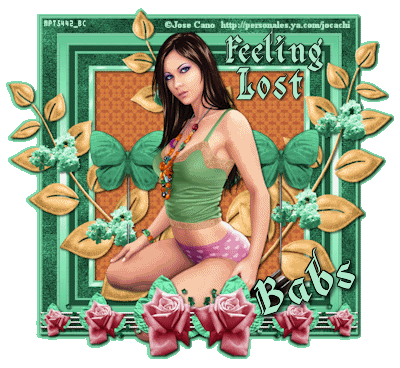
TUBE: I used Jose Cano you must purchase it MPT I have a license mpt5442
KIT: Linda’s Dream Designs Angel Chronicles June 2nd edition Full size kit you can purchase HERE
FONT: Of your choice
READ BELOW BEFORE STARTING
Settings may differ slightly depending on your version.
Close original after you copy it unless I state otherwise.
Sharpen all re-sized items 1 time.
RE-SIZE only one layer unless other wise stated.
Refer to my image for placement of items.
Left click and right click refers to mouse buttons.
Now Lets Start
1. Open a new transparent Image 700x700
Flood fill with white ( or use step 16 and 18 to create transparent background.
2. Select frame 3 from the kit Edit/copy
Edit/paste as new layer into image
Resize it 30%
3. Effects/3D/drop shadow (settings below)
4. Select magic wand (settings below)
click inside the frame window
Selections/modify/expand 15
Keep selected
5. Layers palette right click on bottom layer/add a new raster layer
Select Paper 9 from the kit Edit/copy
Edit/paste into selection
Selections select none
6. Select floral leaves from the kit Edit/copy
Edit/paste as new layer into your image
Re-size it 37%
Apply same drop shadow
Place center in frame
Apply same drop shadow
7. Select pin element from kit Edit/copy
Edit/paste as new layer into your image
Re-size it 15%
Place on left side of frame
Apply same drop shadow
8. Layers palette/right click pin element
duplicate 1 time
Image/mirror
9. Select your tube Edit/copy
Edit/paste as new layer into your image
Re-size if needed. I did not re-size
Apply same drop shadow
10. Select rose bar element from the kit edit/copy
Edit/paste as new layer into your image
Re-size it 20%
Apply same drop shadow
Place at bottom to left side of frame
11. Layers palette/right click rose bar
duplicate 1 time
Image/mirror
12. Using selection tool (settings below)
Draw rectangle around the small rose
Hit delete key to remove it (see my image below)

13. Add new raster layer apply copyrights
14. Add text if you would like to.
15. 13. Layers palette click on eye close off back ground layer
Right click any open layer merge/merge visible
16. Optional How to create a transparent background
Under selections Tab do the following
A. select all,
B. select float.
C. Select defloat.
D modify expand 4
Keep selected.
17. Select dropper tool choose a color from your image
select the background layer
Flood fill the selection
Selections/select none
Delete the merged layer above background layer you added.
18. Edit/copy/copy merged.
Open Animation Shop right click anywhere paste as new animation
Now save the image
18. Save your image
Thanks for trying my tutorial I hope you enjoyed it.
I hope you enjoyed this Tutorial.
Please if you use it to make a stat apply below credit in your footer
Tutorial by: ©Sassy n Simple
HERE or HERE
You can copy and paste the above but if does not work links below
http://www.sassynsimple.com/
And to here http://groups.yahoo.com/group/sassynsimple/
I would Like to Thank the Babs_SassynSimple_TagsnTuts
Testers for testing my tutorial for me.
©Sassy n Simple
THINGS YOU NEED
A Paintshop or Corel Program
You will need a good working knowledge of the program.
TUBE: I used Jose Cano you must purchase it MPT I have a license mpt5442
KIT: Linda’s Dream Designs Angel Chronicles June 2nd edition Full size kit you can purchase HERE
FONT: Of your choice
READ BELOW BEFORE STARTING
Settings may differ slightly depending on your version.
Close original after you copy it unless I state otherwise.
Sharpen all re-sized items 1 time.
RE-SIZE only one layer unless other wise stated.
Refer to my image for placement of items.
Left click and right click refers to mouse buttons.
Now Lets Start
1. Open a new transparent Image 700x700
Flood fill with white ( or use step 16 and 18 to create transparent background.
2. Select frame 3 from the kit Edit/copy
Edit/paste as new layer into image
Resize it 30%
3. Effects/3D/drop shadow (settings below)

4. Select magic wand (settings below)
click inside the frame window
Selections/modify/expand 15
Keep selected

5. Layers palette right click on bottom layer/add a new raster layer
Select Paper 9 from the kit Edit/copy
Edit/paste into selection
Selections select none
6. Select floral leaves from the kit Edit/copy
Edit/paste as new layer into your image
Re-size it 37%
Apply same drop shadow
Place center in frame
Apply same drop shadow
7. Select pin element from kit Edit/copy
Edit/paste as new layer into your image
Re-size it 15%
Place on left side of frame
Apply same drop shadow
8. Layers palette/right click pin element
duplicate 1 time
Image/mirror
9. Select your tube Edit/copy
Edit/paste as new layer into your image
Re-size if needed. I did not re-size
Apply same drop shadow
10. Select rose bar element from the kit edit/copy
Edit/paste as new layer into your image
Re-size it 20%
Apply same drop shadow
Place at bottom to left side of frame
11. Layers palette/right click rose bar
duplicate 1 time
Image/mirror
12. Using selection tool (settings below)
Draw rectangle around the small rose
Hit delete key to remove it (see my image below)

13. Add new raster layer apply copyrights
14. Add text if you would like to.
15. 13. Layers palette click on eye close off back ground layer
Right click any open layer merge/merge visible
16. Optional How to create a transparent background
Under selections Tab do the following
A. select all,
B. select float.
C. Select defloat.
D modify expand 4
Keep selected.
17. Select dropper tool choose a color from your image
select the background layer
Flood fill the selection
Selections/select none
Delete the merged layer above background layer you added.
18. Edit/copy/copy merged.
Open Animation Shop right click anywhere paste as new animation
Now save the image
18. Save your image
Thanks for trying my tutorial I hope you enjoyed it.
I hope you enjoyed this Tutorial.
Please if you use it to make a stat apply below credit in your footer
Tutorial by: ©Sassy n Simple
HERE or HERE
You can copy and paste the above but if does not work links below
http://www.sassynsimple.com/
And to here http://groups.yahoo.com/group/sassynsimple/
I would Like to Thank the Babs_SassynSimple_TagsnTuts
Testers for testing my tutorial for me.
